APIs Device to Cloud Integrate Applications General concept
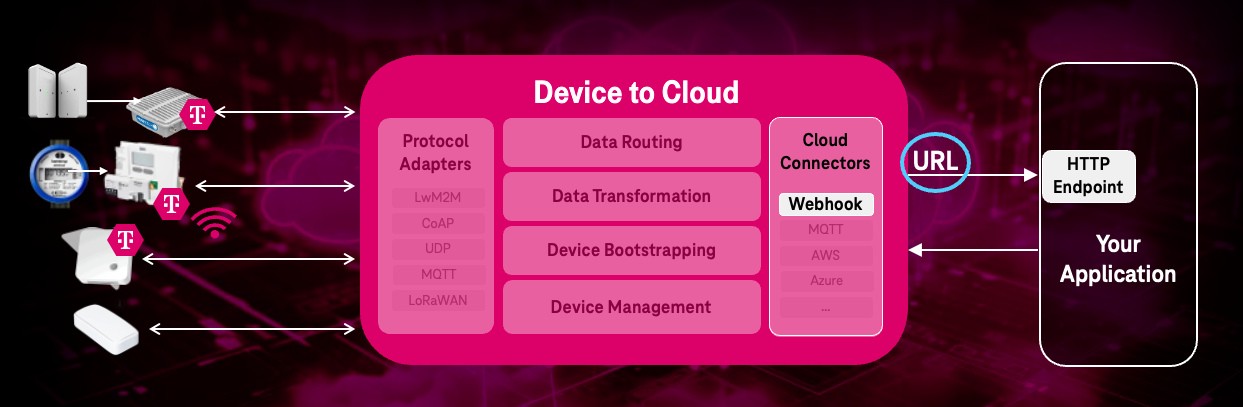
Device to Cloud can integrate different application types and their communication protocols and data formats.
You can forward IoT device data and events to your application(s) by using “device groups” and assigning AEs to them.
Use oneM2M API to add application endpoints
In Device to Cloud your application is represented as Application Entity AE
resource.
In order to receive notifications about various events, create an application represented as AE
.
This AE
contains a point of access (poa) URL:
- Request
- Response
POST {{API_URL}}/device-management-orchestrator/v3/{{TENANT}} HTTP/2
Accept: application/json
Content-Type: application/json;ty=2
X-M2M-Origin: CTestApp
X-M2M-RI: 123
Authorization: Bearer {{ACCESS_TOKEN}}

{
   "m2m:ae": {
    "rn": "TestApp",
    "api": "NTestApp",
    "lbl": [ "type:d2c", "d2c:1.0", "EndpointType:<APPLICATION_TYPE>" ],
    "poa": ["<APPLICATION_ENDPOINT_URL>"]
  }
}
HTTP/1.1 201 Created
  "user-agent": "axios/1.7.4",
  "content-length": "318",
  "accept": "application/json, text/plain, */*",
  "accept-encoding": "gzip, compress, deflate, br",
  "content-type": "application/json",
  "request-context": "appId=cid-v1:",
  "request-id": "|ad...91.",
  "traceparent": "00...01",
  "x-forwarded-for": "...",
  "x-forwarded-host": "...",
  "x-forwarded-proto": "https",
  "X-M2M-Origin": "CTestApp",
  "x-m2m-ri": "06f...e4",
  "x-m2m-rvi": "3",
  "x-ms-request-id": "ad1...d9",
  "x-ms-request-root-id": "|ad1...d9.f6...91."

{
    "m2m:ae": {
    "api": "ND2C-Customer-App01",
    "poa": [
    "<APPLICATION WEBHOOK ENDPOINT URL>"
    ],
    "rn": "d2c-customer-app01",
    "ty": 2,
    "ri": "66fe6b02baa471e374bd0041",
    "aei": "CD2C-Customer-App1",
    "pi": "eos",
    "ct": "20241003T095930,861000",
    "lt": "20241003T095930,861000"
    }
}
Parameters:
apiis the identifier of the application. The first character of the ID shall be a capital ‘N’ (for IDs not defined by a registration authority).lbl(labels)type:d2cspecifies: ThisAEis in scope for Device to Cloud. Refer the following pages for supported APPLICATION_TYPE values.rn(Resource Name) is a unique identifier used in subsequent requests to refer to this specific entity.poa(point of access) represents the list of url addresses where you can add your application endpoint. Only one URL is supported by Device to Cloud.- In
Content-Type,ty=2defines the resource type of “Application Entity” within oneM2M (every entity has its own resource type).
Behind the scenes, a default device group for all new Device to Cloud AEs
will be created. This default device group will be named appEntityNameDefaultGroup and rn (resourceName) if the AE is added to the the group.
Modify the application
By modifying request, you can change the data inside application entity (AE
) including target addresses for subscriptions (point of access)
- Request
- Response
PUT {{API_URL}}/device-management-orchestrator/v3/{{TENANT}}/{{ResourceName}} HTTP/2
Accept: application/json
Content-Type: application/json
X-M2M-Origin: CTestApp
X-M2M-RI: 123
Authorization: Bearer {{ACCESS_TOKEN}}

{
  "m2m:ae": {
    "poa": ["<APPLICATION_WEBHOOK_ENDPOINT_URL>"]
  }
}
  HTTP/1.1 200 OK
  Date: Tue, 03 Dec 2024 09:12:07 GMT
  Content-Type: application/json; charset=utf-8
  Content-Length: 267
  Connection: keep-alive
  Strict-Transport-Security: max-age=31536000; includeSubDomains
  Cache-Control: no-cache, no-store, max-age=0, must-revalidate
  Pragma: no-cache
  Expires: 0
  X-Content-Type-Options: nosniff
  X-Frame-Options: DENY
  X-XSS-Protection: 1; mode=block
  Referrer-Policy: no-referrer
  Vary: Origin

{
  "m2m:ae": {
    "api": "ND2C-Customer-App01",
    "poa": [
      "<APPLICATION_ENDPOINT_URL>"
    ],
    "rn": "d2c-customer-app01",
    "ty": 2,
    "ri": "674ecb2387b651839a70a074",
    "aei": "CD2C-Customer-App01",
    "pi": "d2c-dev-1",
    "ct": "20241203T091059,453000",
    "lt": "20241203T091207,484000",
    "tsn": null
  }
}
Parameters:
apiis the identifier of the application. The first character of the ID shall be a capital ‘N’ (for IDs not defined by a registration authority).rn(Resource Name) is a unique identifier used in subsequent requests to refer to this specific entity.poa(point of access) represents the list of url addresses where you can add e.g. your WebHook endpoint URL.- In
Content-Type,ty=2defines the resource type of “Application Entity” within oneM2M (every entity has its own resource type).
Retrieve application info
Retrieve an application entity (AE
) with the list of target addresses for subscription (point of access):
- Request
- Response
GET {{iot_hub_url}}/device-management-orchestrator/v3/{{tenant_name}}/d2c-customer-app15 HTTP/2
Accept: application/json
Content-Type: application/json
X-M2M-Origin: CTestApp
X-M2M-RI: 123
Authorization: Bearer {{token}}
Cache-Control: no-cache
HTTP/1.1 200 OK
Date: Fri, 31 Jan 2025 12:25:55 GMT
Content-Type: application/json; charset=utf-8
Content-Length: 254
Connection: keep-alive
Strict-Transport-Security: max-age=31536000; includeSubDomains
Cache-Control: no-cache, no-store, max-age=0, must-revalidate
Pragma: no-cache
Expires: 0
X-Content-Type-Options: nosniff
X-Frame-Options: DENY
X-XSS-Protection: 1 ; mode=block
Referrer-Policy: no-referrer
vary: Origin

{
  "m2m:ae": {
    "api": "ND2C-Customer-App154",
    "poa": [
      "<application url>"
    ],
    "rn": "d2c-customer-app15",
    "ty": 2,
    "ri": "6792415c5baf99a8eee604e6",
    "aei": "CD2C-Customer-App154",
    "pi": "d2c-dev-1",
    "ct": "20250123T131716,722000",
    "lt": "20250123T131716,722000"
  }
}
Retrieve device info
Retrieve device information like device model, manufacturer, SIM, credentials, etc. Information is added as sub-objects of type Device Info, SIM or Credentials:
- Request
- Response
GET {{iot_hub_url}}/device-management-orchestrator/v3/{{tenant_name}}/device-001 HTTP/2
Accept: application/json
Content-Type: application/json
X-M2M-Origin: CTestApp
X-M2M-RI: 123
Authorization: Bearer {{token}}
Cache-Control: no-cache
HTTP/1.1 200 OK
Date: Fri, 31 Jan 2025 13:21:48 GMT
Content-Type: application/json; charset=utf-8
Content-Length: 246
Connection: keep-alive
Strict-Transport-Security: max-age=31536000; includeSubDomains
Cache-Control: no-cache, no-store, max-age=0, must-revalidate
Pragma: no-cache
Expires: 0
X-Content-Type-Options: nosniff
X-Frame-Options: DENY
X-XSS-Protection: 1 ; mode=block
Referrer-Policy: no-referrer
vary: Origin

{
"m2m:nod": {
  "ni": "urn:gsma:imei:3519345467823497",
  "lbl": [
    "profile:SCS-LwM2M",
    "ICCID:89882280000004495167987"
  ],
  "rn": "device-001",
  "ty": 14,
  "ri": "679891c55189abce137ed7c4",
  "pi": "d2c-dev-1",
  "ct": "20250128T081357,907000",
  "lt": "20250128T081357,907000"
  }
}
Create a subscription group for devices
You can receive device messages and notifications about various events.
Device groups let you define which device data is passed on to applications.
To get information about node resource name or an AE resource name .
A group can contain multiple applications and as many devices as you need:
- Devices:
ndsnode resource name array - Applications:
aesAE resource name array
Of course, you can add one application to multiple groups.
- Request
- Response
POST {{API_URL}}/device-management-orchestrator/v3/{{TENANT}}/device-group HTTP/2
Accept: application/json
Content-Type: application/json;ty=28
X-M2M-Origin: CDevice-Group
X-M2M-RI: 123
Authorization: Bearer {{ACCESS_TOKEN}}

{
    "dtiot:devGr": {
        "cnd": "com.telekom.iot.orchestrator.deviceGroup",
        "rn": "myDeviceGroup",
        "nds": [ "testDevice","<device_rn_2>", "...", "..." ],
        "aes": [ "testAppEntity" ],
        "lbl": [ "d2c:1.0"]
    }
}
HTTP/1.1 201 Created

  {
      "dtiot:devGr": {
        "containerDefinition": "com.telekom.iot.orchestrator.deviceGroup",
        "resourceName": "myDeviceGroup",
        "nodes": [
          "testDevice"
        ],
        "applicationEntities": [
          "testAppEntity"
        ],
        "resourceType": 28,
        "creator": "CDevice-Group",
        "stateTag": 0,
        "resourceID": "673c9aa261db250e5c92d3fc",
        "parentID": "6724bb7507f20523ba2c6f13",
        "creationTime": "20241119T140314,352000",
        "lastModifiedTime": "20241119T140314,352000"
      }
    }
Parameters:
ty=28= flexContainerrn= resource name = the group name
Delete application
By deleting an application entity (AE
), all related data subscriptions for the device to the application entities are removed:
- Request
- Response
DELETE {{API_URL}}/device-management-orchestrator/v3/{{TENANT}}/{{ResourceName}} HTTP/2
Accept: application/json
Content-Type: application/json;ty=2
X-M2M-Origin: CTestApp
X-M2M-RI: 123
Authorization: Bearer {{ACCESS_TOKEN}}
HTTP/1.1 200 OK
  Date: Mon, 02 Dec 2024 21:01:14 GMT
  Content-Type: text/plain; charset=utf-8
  Content-Length: 0
  Connection: keep-alive
  Strict-Transport-Security: max-age=31536000; includeSubDomains
  Cache-Control: no-cache, no-store, max-age=0, must-revalidate
  Pragma: no-cache
  Expires: 0
  X-Content-Type-Options: nosniff
  X-Frame-Options: DENY
  X-XSS-Protection: 1; mode=block
  Referrer-Policy: no-referrer
  Vary: Origin

{}
Remove a device group
By removing a device group, all related data subscriptions for the nodes to the AEs are removed:
- received-msg subscription
- error-msg subscription
- Request
- Response
DELETE {{API_URL}}/device-management-orchestrator/v3/{{TENANT}}/device-group/myDeviceGroup HTTP/2
Accept: application/json
Content-Type: application/json;ty=28
X-M2M-Origin: CTestApp
X-M2M-RI: 123
Authorization: Bearer {{ACCESS_TOKEN}}
HTTP/1.1 200 OK
Update a device group
Device groups let you add devices and application entities.
To get information about node resource name or an AE resource name .
A group can contain multiple applications and as many devices as you need:
- Devices:
ndsnode resource name array - Applications:
aesAE resource name array
- Request
- Response
PUT {{API_URL}}/device-management-orchestrator/v3/{{TENANT}}/device-group/myDeviceGroup HTTP/2
Accept: application/json
Content-Type: application/json
X-M2M-Origin: CTestApp
X-M2M-RI: 123
Authorization: Bearer {{ACCESS_TOKEN}}

{
    "dtiot:devGr": {
        "nds": [ "testDevice","<device_rn_2>", "...", "..." ],
        "aes": [ "testAppEntity", "<ae_rn_2>", "...", "..." ]
    }
}
HTTP/1.1 200 OK

{
    "dtiot:devGr": {
      "containerDefinition": "com.telekom.iot.orchestrator.deviceGroup",
      "resourceName": "myDeviceGroup",
      "nodes": [
        "testDevice1",
        "testDevice2",
        "<device_rn_3>",
      ],
      "applicationEntities": [
        "testAppEntity1",
        "testAppEntity2",
        "<ae_rn_3>"
      ],
      "resourceType": 28,
      "creator": "CDevice-Group",
      "stateTag": 0,
      "resourceID": "673c9aa261db250e5c92d3fc",
      "parentID": "6724bb7507f20523ba2c6f13",
      "creationTime": "20241119T140314,352000",
      "lastModifiedTime": "20241119T140314,352000"
    }
  }