APIs Device to Cloud Integrate Applications Azure Event Hub
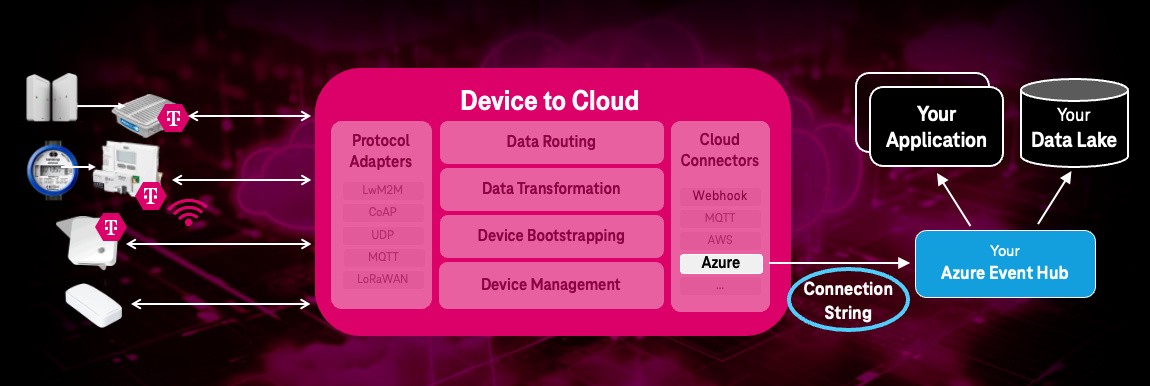
Device to Cloud can integrate different application types and their communication protocols and data formats.
You can forward IoT device data and events to your application(s) by using “device groups” and assigning AEs to them.
Configure an “Event Hub” Receiver
Event Hubs can be configure AEs using the label EndpointType:AzureEventHub. These AEs can be assigned to device groups to forward device data to an Azure Event Hub (subscription for the received-msg container).
IMPORTANT: The implementation is designed to be extensible for future connector endpoint types (for example,
AWS IoT Core,Webhook Classic,ThingsBoard, etc.). The Label Dispatcher pattern enables easy addition of new handler types.
The service identifies AE creation/change events and:
- Configures the Event Hub connector endpoint using
/message/:tenantName/:AERN - Ensures a
connector-logscontainer is created for error tracking and customer visibility - Writes important logs and errors to the
connector-logscontainer - Supports customer viewing of
connector-logsvia D2C GUI or DMO API
To create an Event Hub AE, use this request:
- Request
POST {{iot_hub_url}}/device-management-orchestrator/v3/{{tenant_name}} HTTP/2
Accept: application/json
Content-Type: application/json;ty=2
fullName: {{fullname}}
X-M2M-Origin: CD2C-EH-Customer-AE
X-M2M-RI: 123
Authorization: Bearer {{token}}
Cache-Control: no-cache

{
  "m2m:ae": {
    "lbl": [
      "d2c:1.0",
      "type:d2c",
      "EndpointType:AzureEventHub",
      "EH_Name:d2c-dev-event-hub1",
      "MAX_BATCH_COUNT:100",
      "MAX_EH_CONN_CACHE_TIME:120000",
      "SHUTDOWN_TIMEOUT_MS:5000",
      "EH_ConnStr:base64_encoded_connection_string"
    ],
    "api": "ND2C-EH-Customer-AE-App001",
    "rn": "d2c-eh-customer-ae-app001"
  }
}
Parameters:
apiis the identifier of the application. The first character of the ID shall be a capital ‘N’ (for IDs not defined by a registration authority).rn(Resource Name) is a unique identifier used in subsequent requests to refer to this specific entity.lbl(labels) contains configuration parameters for the Event Hub endpoint:d2c:1.0(required) - D2C protocol versiontype:d2c(required) - AE type indicator for Device-to-CloudEndpointType:AzureEventHub(required) - Identifies the endpoint typeEH_Name:<Event Hub name>(required) - Azure Event Hub nameEH_ConnStr:<Connection string>(required) - Base64 encoded connection stringMAX_BATCH_COUNT:<Number>(optional, default:100) - Allowed values:1-1000MAX_EH_CONN_CACHE_TIME:<Milliseconds>(optional, default:120000) - Allowed values:1000-600000SHUTDOWN_TIMEOUT_MS:<Milliseconds>(optional, default:5000) - Graceful shutdown wait time
Connection details are cached in memory with configurable timeout for performance optimization. The cache is invalidated on AE update or deletion.
Batching strategy:
- Messages are accumulated in memory per AE
- Batches are sent when either condition is met:
MAX_BATCH_COUNTmessages are queuedMAX_EH_CONN_CACHE_TIMEmilliseconds have elapsed since the first message
- Failed sends are retried automatically
- Connection details are cached with TTL to reduce DMO API calls
Modify an Event Hub AE
By modifying request, you can change the Event Hub configuration parameters including Event Hub name, connection string, and batching settings:
- Request
- Response
PUT {{iot_hub_url}}/device-management-orchestrator/v3/{{tenant_name}}/d2c-eh-customer-ae-app001 HTTP/2
Accept: application/json
Content-Type: application/json
X-M2M-Origin: CD2C-EH-Customer-AE
X-M2M-RI: 123
Authorization: Bearer {{token}}

{
  "m2m:ae": {
    "lbl": [
      "d2c:1.0",
      "type:d2c",
      "EndpointType:AzureEventHub",
      "EH_Name:d2c-prod-event-hub1",
      "MAX_BATCH_COUNT:200",
      "MAX_EH_CONN_CACHE_TIME:180000",
      "SHUTDOWN_TIMEOUT_MS:10000",
      "EH_ConnStr:updated_base64_encoded_connection_string"
    ]
  }
}
HTTP/1.1 200 OK
Date: Tue, 03 Dec 2024 09:12:07 GMT
Content-Type: application/json; charset=utf-8
Connection: keep-alive

{
  "m2m:ae": {
    "api": "ND2C-EH-Customer-AE-App001",
    "lbl": [
      "d2c:1.0",
      "type:d2c",
      "EndpointType:AzureEventHub",
      "EH_Name:d2c-prod-event-hub1",
      "MAX_BATCH_COUNT:200",
      "MAX_EH_CONN_CACHE_TIME:180000",
      "SHUTDOWN_TIMEOUT_MS:10000",
      "EH_ConnStr:updated_base64_encoded_connection_string"
    ],
    "rn": "d2c-eh-customer-ae-app001",
    "ty": 2,
    "ri": "674ecb2387b651839a70a074",
    "aei": "CD2C-EH-Customer-AE-App001",
    "pi": "d2c-dev-1",
    "ct": "20241203T091059,453000",
    "lt": "20241203T091207,484000"
  }
}
Delete an Event Hub AE
By deleting an Event Hub application entity (AE
), all related data subscriptions for the devices to the Event Hub endpoint are removed. Additionally, the associated connector-logs container is also removed:
- Request
- Response
DELETE {{iot_hub_url}}/device-management-orchestrator/v3/{{tenant_name}}/d2c-eh-customer-ae-app001 HTTP/2
Accept: application/json
Content-Type: application/json
X-M2M-Origin: CD2C-EH-Customer-AE
X-M2M-RI: 123
Authorization: Bearer {{token}}
HTTP/1.1 200 OK
Date: Tue, 03 Dec 2024 09:15:12 GMT
Content-Type: text/plain; charset=utf-8
Content-Length: 0
Connection: keep-alive

{}