APIs Device to Cloud Integrate applications
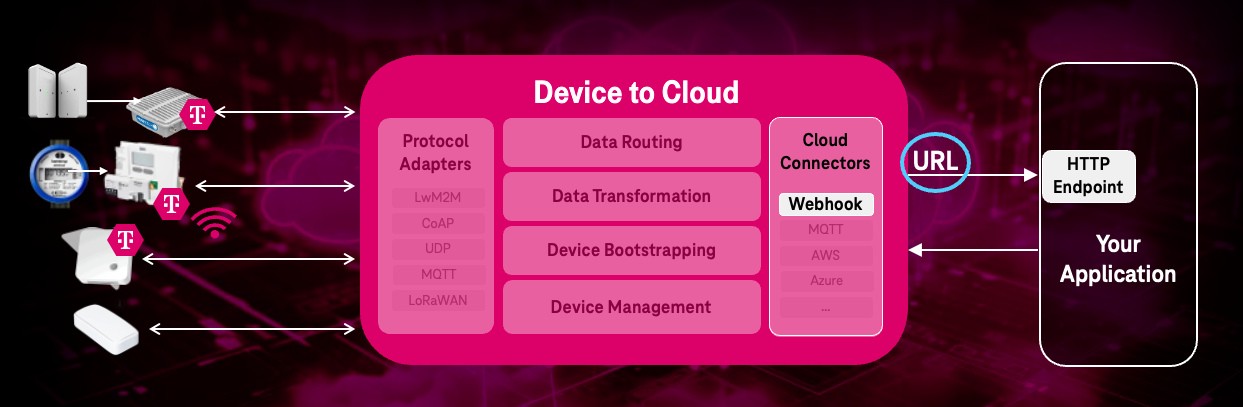
Device to Cloud can integrate different application types and their communication protocols and data formats.
You can forward IoT device data and events to your application(s) by using “device groups” and assigning AEs to them.
Use oneM2M API to add application webhook endpoints
A webhook is the easiest way to send real-time IoT data to your business application using HTTP requests.
Webhooks make integration is as easy as copying and pasting your webhook endpoint URL. The URL comprises all the necessary credentials.
In Device to Cloud your (webhook) application is represented as Application Entity AE
resource.
In order to receive notifications about various events, create an application represented as AE
.
This AE
contains a point of access URL:
- Request
- Response
POST {{API_URL}}/device-management-orchestrator/v3/{{TENANT}} HTTP/2
Accept: application/json
Content-Type: application/json;ty=2
X-M2M-Origin: CTestApp
X-M2M-RI: 123
Authorization: Bearer {{ACCESS_TOKEN}}

{
   "m2m:ae": {
    "rn": "TestApp",
    "api": "NTestApp",
    "lbl": [ "type:d2c", "d2c:1.0", "EndpointType:WebHook" ],
    "poa": ["<APPLICATION_WEBHOOK_ENDPOINT_URL>"]
  }
}
HTTP/1.1 201 Created
  "user-agent": "axios/1.7.4",
  "content-length": "318",
  "accept": "application/json, text/plain, */*",
  "accept-encoding": "gzip, compress, deflate, br",
  "content-type": "application/json",
  "request-context": "appId=cid-v1:",
  "request-id": "|ad...91.",
  "traceparent": "00...01",
  "x-forwarded-for": "...",
  "x-forwarded-host": "...",
  "x-forwarded-proto": "https",
  "X-M2M-Origin": "CTestApp",
  "x-m2m-ri": "06f...e4",
  "x-m2m-rvi": "3",
  "x-ms-request-id": "ad1...d9",
  "x-ms-request-root-id": "|ad1...d9.f6...91."

{
    "m2m:ae": {
    "api": "ND2C-Customer-App01",
    "poa": [
    "<APPLICATION WEBHOOK ENDPOINT URL>"
    ],
    "rn": "d2c-customer-app01",
    "ty": 2,
    "ri": "66fe6b02baa471e374bd0041",
    "aei": "CD2C-Customer-App1",
    "pi": "eos",
    "ct": "20241003T095930,861000",
    "lt": "20241003T095930,861000"
    }
}
Parameters:
apiis the identifier of the application. The first character of the ID shall be a capital ‘N’ (for IDs not defined by a registration authority).lbl(labels)type:d2cspecifies: ThisAEis in scope for Device to Cloud.rn(Resource Name) is a unique identifier used in subsequent requests to refer to this specific entity.poa(point of access) represents the list of url addresses where you can add your WebHook endpoint URL. Only one URL is supported by Device to Cloud.poah(point of access header) is a list of headers for webhook in format ‘key:value’ (‘header field: value of header field’)
Following headers in poah are not allowed:
- Accept
- Authorization
- Content-Type
- Content-Length
- Content-Encoding
- Cookie
- In
Content-Type,ty=2defines the resource type of “Application Entity” within oneM2M (every entity has its own resource type).
Behind the scenes, a default device group for all new Device to Cloud AEs
will be created. This default device group will be named appEntityNameDefaultGroup and rn (resourceName) if the AE is added to the the group.
Modify the application
By modifying request, you can change the data inside application entity (AE
) including target addresses for subscriptions (point of access)
- Request
- Response
PUT {{API_URL}}/device-management-orchestrator/v3/{{TENANT}}/{{ResourceName}} HTTP/2
Accept: application/json
Content-Type: application/json
X-M2M-Origin: CTestApp
X-M2M-RI: 123
Authorization: Bearer {{ACCESS_TOKEN}}

{
  "m2m:ae": {
    "poa": ["<APPLICATION_WEBHOOK_ENDPOINT_URL>"]
  }
}
  HTTP/1.1 200 OK
  Date: Tue, 03 Dec 2024 09:12:07 GMT
  Content-Type: application/json; charset=utf-8
  Content-Length: 267
  Connection: keep-alive
  Strict-Transport-Security: max-age=31536000; includeSubDomains
  Cache-Control: no-cache, no-store, max-age=0, must-revalidate
  Pragma: no-cache
  Expires: 0
  X-Content-Type-Options: nosniff
  X-Frame-Options: DENY
  X-XSS-Protection: 1; mode=block
  Referrer-Policy: no-referrer
  Vary: Origin

{
  "m2m:ae": {
    "api": "ND2C-Customer-App01",
    "poa": [
      "<APPLICATION_WEBHOOK_ENDPOINT_URL>"
    ],
    "rn": "d2c-customer-app01",
    "ty": 2,
    "ri": "674ecb2387b651839a70a074",
    "aei": "CD2C-Customer-App01",
    "pi": "d2c-dev-1",
    "ct": "20241203T091059,453000",
    "lt": "20241203T091207,484000",
    "tsn": null
  }
}
Parameters:
apiis the identifier of the application. The first character of the ID shall be a capital ‘N’ (for IDs not defined by a registration authority).rn(Resource Name) is a unique identifier used in subsequent requests to refer to this specific entity.poa(point of access) represents the list of url addresses where you can add your WebHook endpoint URL.- In
Content-Type,ty=2defines the resource type of “Application Entity” within oneM2M (every entity has its own resource type).
Retrieve application info
Retrieve an application entity (AE
) with the list of target addresses for subscription (point of access):
- Request
- Response
GET {{iot_hub_url}}/device-management-orchestrator/v3/{{tenant_name}}/d2c-customer-app15 HTTP/2
Accept: application/json
Content-Type: application/json
X-M2M-Origin: CTestApp
X-M2M-RI: 123
Authorization: Bearer {{token}}
Cache-Control: no-cache
HTTP/1.1 200 OK
Date: Fri, 31 Jan 2025 12:25:55 GMT
Content-Type: application/json; charset=utf-8
Content-Length: 254
Connection: keep-alive
Strict-Transport-Security: max-age=31536000; includeSubDomains
Cache-Control: no-cache, no-store, max-age=0, must-revalidate
Pragma: no-cache
Expires: 0
X-Content-Type-Options: nosniff
X-Frame-Options: DENY
X-XSS-Protection: 1 ; mode=block
Referrer-Policy: no-referrer
vary: Origin

{
  "m2m:ae": {
    "api": "ND2C-Customer-App154",
    "poa": [
      "<customer url>",
      "<customer url>"
    ],
    "rn": "d2c-customer-app15",
    "ty": 2,
    "ri": "6792415c5baf99a8eee604e6",
    "aei": "CD2C-Customer-App154",
    "pi": "d2c-dev-1",
    "ct": "20250123T131716,722000",
    "lt": "20250123T131716,722000"
  }
}
Configure an “Event Hub” Receiver
Customers can configure AEs with label EndpointType:AzureEventHub. These AEs can be assigned to device groups to forward device data to an Azure Event Hub (subscription for the received-msg container).
IMPORTANT: The implementation is designed to be extensible for future connector endpoint types (for example,
AWS IoT Core,Webhook Classic,ThingsBoard, etc.). The Label Dispatcher pattern enables easy addition of new handler types.
The service identifies AE creation/change events and:
- Configures the Event Hub connector endpoint using
/message/:tenantName/:AERN - Ensures a
connector-logscontainer is created for error tracking and customer visibility - Writes important logs and errors to the
connector-logscontainer - Supports customer viewing of
connector-logsvia D2C GUI or DMO API
To create an Event Hub AE, use this request:
- Request
POST {{iot_hub_url}}/device-management-orchestrator/v3/{{tenant_name}} HTTP/2
Accept: application/json
Content-Type: application/json;ty=2
fullName: {{fullname}}
X-M2M-Origin: CD2C-EH-Customer-AE
X-M2M-RI: 123
Authorization: Bearer {{token}}
Cache-Control: no-cache

{
  "m2m:ae": {
    "lbl": [
      "d2c:1.0",
      "type:d2c",
      "EndpointType:AzureEventHub",
      "EH_Name:d2c-dev-event-hub1",
      "MAX_BATCH_COUNT:100",
      "MAX_EH_CONN_CACHE_TIME:120000",
      "SHUTDOWN_TIMEOUT_MS:5000",
      "EH_ConnStr:base64_encoded_connection_string"
    ],
    "api": "ND2C-EH-Customer-AE-App001",
    "rn": "d2c-eh-customer-ae-app001"
  }
}
Parameters:
apiis the identifier of the application. The first character of the ID shall be a capital ‘N’ (for IDs not defined by a registration authority).rn(Resource Name) is a unique identifier used in subsequent requests to refer to this specific entity.lbl(labels) contains configuration parameters for the Event Hub endpoint:d2c:1.0(required) - D2C protocol versiontype:d2c(required) - AE type indicator for Device-to-CloudEndpointType:AzureEventHub(required) - Identifies the endpoint typeEH_Name:<Event Hub name>(required) - Azure Event Hub nameEH_ConnStr:<Connection string>(required) - Base64 encoded connection stringMAX_BATCH_COUNT:<Number>(optional, default:100) - Allowed values:1-1000MAX_EH_CONN_CACHE_TIME:<Milliseconds>(optional, default:120000) - Allowed values:1000-600000SHUTDOWN_TIMEOUT_MS:<Milliseconds>(optional, default:5000) - Graceful shutdown wait time
Connection details are cached in memory with configurable timeout for performance optimization. The cache is invalidated on AE update or deletion.
Batching strategy:
- Messages are accumulated in memory per AE
- Batches are sent when either condition is met:
MAX_BATCH_COUNTmessages are queuedMAX_EH_CONN_CACHE_TIMEmilliseconds have elapsed since the first message
- Failed sends are retried automatically
- Connection details are cached with TTL to reduce DMO API calls
Modify an Event Hub AE
By modifying request, you can change the Event Hub configuration parameters including Event Hub name, connection string, and batching settings:
- Request
- Response
PUT {{iot_hub_url}}/device-management-orchestrator/v3/{{tenant_name}}/d2c-eh-customer-ae-app001 HTTP/2
Accept: application/json
Content-Type: application/json
X-M2M-Origin: CD2C-EH-Customer-AE
X-M2M-RI: 123
Authorization: Bearer {{token}}

{
  "m2m:ae": {
    "lbl": [
      "d2c:1.0",
      "type:d2c",
      "EndpointType:AzureEventHub",
      "EH_Name:d2c-prod-event-hub1",
      "MAX_BATCH_COUNT:200",
      "MAX_EH_CONN_CACHE_TIME:180000",
      "SHUTDOWN_TIMEOUT_MS:10000",
      "EH_ConnStr:updated_base64_encoded_connection_string"
    ]
  }
}
HTTP/1.1 200 OK
Date: Tue, 03 Dec 2024 09:12:07 GMT
Content-Type: application/json; charset=utf-8
Connection: keep-alive

{
  "m2m:ae": {
    "api": "ND2C-EH-Customer-AE-App001",
    "lbl": [
      "d2c:1.0",
      "type:d2c",
      "EndpointType:AzureEventHub",
      "EH_Name:d2c-prod-event-hub1",
      "MAX_BATCH_COUNT:200",
      "MAX_EH_CONN_CACHE_TIME:180000",
      "SHUTDOWN_TIMEOUT_MS:10000",
      "EH_ConnStr:updated_base64_encoded_connection_string"
    ],
    "rn": "d2c-eh-customer-ae-app001",
    "ty": 2,
    "ri": "674ecb2387b651839a70a074",
    "aei": "CD2C-EH-Customer-AE-App001",
    "pi": "d2c-dev-1",
    "ct": "20241203T091059,453000",
    "lt": "20241203T091207,484000"
  }
}
Delete an Event Hub AE
By deleting an Event Hub application entity (AE
), all related data subscriptions for the devices to the Event Hub endpoint are removed. Additionally, the associated connector-logs container is also removed:
- Request
- Response
DELETE {{iot_hub_url}}/device-management-orchestrator/v3/{{tenant_name}}/d2c-eh-customer-ae-app001 HTTP/2
Accept: application/json
Content-Type: application/json
X-M2M-Origin: CD2C-EH-Customer-AE
X-M2M-RI: 123
Authorization: Bearer {{token}}
HTTP/1.1 200 OK
Date: Tue, 03 Dec 2024 09:15:12 GMT
Content-Type: text/plain; charset=utf-8
Content-Length: 0
Connection: keep-alive

{}
Retrieve device info
Retrieve device information like device model, manufacturer, SIM, credentials, etc. Information is added as sub-objects of type Device Info, SIM or Credentials:
- Request
- Response
GET {{iot_hub_url}}/device-management-orchestrator/v3/{{tenant_name}}/device-001 HTTP/2
Accept: application/json
Content-Type: application/json
X-M2M-Origin: CTestApp
X-M2M-RI: 123
Authorization: Bearer {{token}}
Cache-Control: no-cache
HTTP/1.1 200 OK
Date: Fri, 31 Jan 2025 13:21:48 GMT
Content-Type: application/json; charset=utf-8
Content-Length: 246
Connection: keep-alive
Strict-Transport-Security: max-age=31536000; includeSubDomains
Cache-Control: no-cache, no-store, max-age=0, must-revalidate
Pragma: no-cache
Expires: 0
X-Content-Type-Options: nosniff
X-Frame-Options: DENY
X-XSS-Protection: 1 ; mode=block
Referrer-Policy: no-referrer
vary: Origin

{
"m2m:nod": {
  "ni": "urn:gsma:imei:3519345467823497",
  "lbl": [
    "profile:SCS-LwM2M",
    "ICCID:89882280000004495167987"
  ],
  "rn": "device-001",
  "ty": 14,
  "ri": "679891c55189abce137ed7c4",
  "pi": "d2c-dev-1",
  "ct": "20250128T081357,907000",
  "lt": "20250128T081357,907000"
  }
}
Create a subscription group for devices
You can receive device messages and notifications about various events.
Device groups let you define which device data is passed on to applications.
To get information about node resource name or an AE resource name .
A group can contain multiple applications and as many devices as you need:
- Devices:
ndsnode resource name array - Applications:
aesAE resource name array
Of course, you can add one application to multiple groups.
- Request
- Response
POST {{API_URL}}/device-management-orchestrator/v3/{{TENANT}}/device-group HTTP/2
Accept: application/json
Content-Type: application/json;ty=28
X-M2M-Origin: CDevice-Group
X-M2M-RI: 123
Authorization: Bearer {{ACCESS_TOKEN}}

{
    "dtiot:devGr": {
        "cnd": "com.telekom.iot.orchestrator.deviceGroup",
        "rn": "myDeviceGroup",
        "nds": [ "testDevice","<device_rn_2>", "...", "..." ],
        "aes": [ "testAppEntity" ],
        "lbl": [ "d2c:1.0"]
    }
}
HTTP/1.1 201 Created

  {
      "dtiot:devGr": {
        "containerDefinition": "com.telekom.iot.orchestrator.deviceGroup",
        "resourceName": "myDeviceGroup",
        "nodes": [
          "testDevice"
        ],
        "applicationEntities": [
          "testAppEntity"
        ],
        "resourceType": 28,
        "creator": "CDevice-Group",
        "stateTag": 0,
        "resourceID": "673c9aa261db250e5c92d3fc",
        "parentID": "6724bb7507f20523ba2c6f13",
        "creationTime": "20241119T140314,352000",
        "lastModifiedTime": "20241119T140314,352000"
      }
    }
Parameters:
ty=28= flexContainerrn= resource name = the group name
Receive notification via webhook
In case of sending Operations like READ, WRITE, EXECUTE, OBSERVE notifications about incoming messages will be sent to the webhook defined as “poa” in Application Entity
2 modes were supported for sending an outgoing message i.e Protocol specific mode and REST API mode.
READ
- Request
- Notification
Protocol specific mode
POST {{API_URL}}/device-management-orchestrator/v3/{{TENANT}}/device-communication/device001/outgoing-msg
Accept: application/json
Content-Type: application/json;ty=4
fullName: {{fullname}}
X-M2M-Origin: CDevice-Provisioning
X-M2M-RI: 123
Authorization: Bearer {{ACCESS_TOKEN}}

{
  "m2m:cin": {
    "con": "READ /3303/0/5700"
  }
}
REST API mode
POST {{API_URL}}/device-management-orchestrator/v3/{{TENANT}}/device-communication/device001/outgoing-msg
Accept: application/json
Content-Type: application/json;ty=4
fullName: {{fullname}}
X-M2M-Origin: CDevice-Provisioning
X-M2M-RI: 123
Authorization: Bearer {{ACCESS_TOKEN}}

{
  "m2m:cin": {
    "con": {
      "method": "READ",
      "path": "/3303/0/5700"
    },
    "cnf": "application/json:0"
  }
}
{
  "m2m:sgn": {
    "nev": {
      "rep": {
        "m2m:cin": {
          "con": {
            "noRNe": "device001",
            "time": 1757681383690,
            "messageType": "response",
            "resourcePath": "3303/0/5700",
            "dataValue": {
              "3303/0/5700": -703.9
            }
          },
          "lbl": [
            "updates_timestamp: 1757681331816",
            "d2c:1.0",
            "expirations_timestamp: 1757582951268",
            "registrations_timestamp: 1733389745807"
          ],
          "cnf": "application/json:0",
          "ty": 4,
          "cs": 158,
          "st": 476,
          "cr": "CDevice-Provisioning",
          "rn": "e323d324-0fa7-4352-a5b6-18f784ca5921",
          "ri": "68c416e826a6c2a06344c300",
          "pi": "689dd12bb41e8b5c4d36ac02",
          "ct": "20250912T124944,772000",
          "lt": "20250912T124944,772000"
        }
      },
      "net": 3
    },
    "sur": "d2c-dev-1/68c416d000e9bf7f73efd620"
  }
}
Response key components:
m2m:sgn- oneM2M Signal/Notification wrappernev- Notification Event containing:net- Notification Event Type (1=create, 2=update, 3=delete, 4=retrieve)rep- Representation of the resource that triggered the notificationm2m:cin- Content Instance (IoT data container) with:con- Content (the actual IoT device data)cnf- Content Formatcr- Creatorcs- Content Sizect- Creation Timelt- Last Modified Timepi- Parent IDri- Resource IDrn- Resource Namest- State Tagty- Type (4 = Content Instance)sur- Subscription URI Reference
WRITE
- Request
- Notification
Protocol specific mode
POST {{API_URL}}/device-management-orchestrator/v3/{{TENANT}}/device-communication/device001/outgoing-msg
Accept: application/json
Content-Type: application/json;ty=4
fullName: {{fullname}}
X-M2M-Origin: CDevice-Provisioning
X-M2M-RI: 123
Authorization: Bearer {{ACCESS_TOKEN}}

{
  "m2m:cin": {
    "con": "WRITE /3442/0/1130/0  31.4159265"
  }
}
REST API mode
POST {{API_URL}}/device-management-orchestrator/v3/{{TENANT}}/device-communication/device001/outgoing-msg
Accept: application/json
Content-Type: application/json;ty=4
fullName: {{fullname}}
X-M2M-Origin: CDevice-Provisioning
X-M2M-RI: 123
Authorization: Bearer {{ACCESS_TOKEN}}

{
    "m2m:cin": {
        "con": {
            "method": "WRITE",
            "path": "/3442/0/1130/0",
            "value": "31.4159265"
        },
        "cnf": "application/json:0"
    }
},
{
  "m2m:sgn": {
    "nev": {
      "rep": {
        "m2m:cin": {
          "con": {
            "noRNe": "device001",
            "time": 1757691320584,
            "messageType": "response",
            "resourcePath": "3442/0/1130/0",
            "dataValue": null
          },
          "lbl": [
            "updates_timestamp: 1757691301135",
            "d2c:1.0",
            "expirations_timestamp: 1757582951268",
            "registrations_timestamp: 1733389745807"
          ],
          "cnf": "application/json:0",
          "ty": 4,
          "cs": 142,
          "st": 479,
          "cr": "CDevice-Provisioning",
          "rn": "2b3c0747-4f5d-469e-bc51-11497be0e402",
          "ri": "68c43db900e9bf7f73efd964",
          "pi": "689dd12bb41e8b5c4d36ac02",
          "ct": "20250912T153521,635000",
          "lt": "20250912T153521,635000"
        }
      },
      "net": 3
    },
    "sur": "d2c-dev-1/68c416d000e9bf7f73efd620"
  }
}
EXECUTE
- Request
- Notification
Protocol specific mode
POST {{API_URL}}/device-management-orchestrator/v3/{{TENANT}}/device-communication/device001/outgoing-msg
Accept: application/json
Content-Type: application/json;ty=4
fullName: {{fullname}}
X-M2M-Origin: CDevice-Provisioning
X-M2M-RI: 123
Authorization: Bearer {{ACCESS_TOKEN}}

{
  "m2m:cin": {
    "con": "EXECUTE /3442/0/2"
  }
}
REST API mode
POST {{API_URL}}/device-management-orchestrator/v3/{{TENANT}}/device-communication/device001/outgoing-msg
Accept: application/json
Content-Type: application/json;ty=4
fullName: {{fullname}}
X-M2M-Origin: CDevice-Provisioning
X-M2M-RI: 123
Authorization: Bearer {{ACCESS_TOKEN}}

{
    "m2m:cin": {
        "con": {
            "method": "EXECUTE",
            "path": "/3442/0/2",
        },
        "cnf": "application/json:0"
    }
},
{
  "m2m:sgn": {
    "nev": {
      "rep": {
        "m2m:cin": {
          "con": {
            "noRNe": "device001",
            "time": 1757691600071,
            "messageType": "response",
            "resourcePath": "3442/0/2",
            "dataValue": null
          },
          "lbl": [
            "updates_timestamp: 1757691566272",
            "d2c:1.0",
            "expirations_timestamp: 1757582951268",
            "registrations_timestamp: 1733389745807"
          ],
          "cnf": "application/json:0",
          "ty": 4,
          "cs": 137,
          "st": 480,
          "cr": "CDevice-Provisioning",
          "rn": "b22c7a15-3453-4e3f-89f4-b442ee66667d",
          "ri": "68c43ed126a6c2a06344c65a",
          "pi": "689dd12bb41e8b5c4d36ac02",
          "ct": "20250912T154001,156000",
          "lt": "20250912T154001,156000"
        }
      },
      "net": 3
    },
    "sur": "d2c-dev-1/68c416d000e9bf7f73efd620"
  }
}
OBSERVE
- Request
- Notification
Protocol specific mode
POST {{API_URL}}/device-management-orchestrator/v3/{{TENANT}}/device-communication/device001/outgoing-msg
Accept: application/json
Content-Type: application/json;ty=4
fullName: {{fullname}}
X-M2M-Origin: CDevice-Provisioning
X-M2M-RI: 123
Authorization: Bearer {{ACCESS_TOKEN}}

{
  "m2m:cin": {
    "con": "OBSERVE /3303/0/5700"
  }
}
REST API mode
POST {{API_URL}}/device-management-orchestrator/v3/{{TENANT}}/device-communication/device001/outgoing-msg
Accept: application/json
Content-Type: application/json;ty=4
fullName: {{fullname}}
X-M2M-Origin: CDevice-Provisioning
X-M2M-RI: 123
Authorization: Bearer {{ACCESS_TOKEN}}

{
    "m2m:cin": {
        "con": {
            "method": "OBSERVE",
            "path": "/3303",
        },
        "cnf": "application/json:0"
    }
},
{
  "m2m:sgn": {
    "nev": {
      "rep": {
        "m2m:cin": {
          "con": {
            "noRNe": "device001",
            "time": 1757505188559,
            "messageType": "notify",
            "resourcePath": "/3303/0/5700",
            "dataValue": -32.9,
            "attributes": {}
          },
          "lbl": [
            "updates_timestamp: 1757691566272",
            "d2c:1.0",
            "expirations_timestamp: 1757582951268",
            "registrations_timestamp: 1733389745807"
          ],
          "cnf": "application/json:0",
          "ty": 4,
          "cs": 157,
          "st": 480,
          "cr": "CDevice-Provisioning",
          "rn": "fcc4f268-ab25-48e4-989c-8f1cbd601706",
          "ri": "68c166a526a6c2a0634487d7",
          "pi": "689dd12bb41e8b5c4d36ac02",
          "ct": "20250912T161031,458961",
          "lt": "20250912T161031,458961"
        }
      },
      "net": 3
    },
    "sur": "d2c-dev-1/68c416d000e9bf7f73efd620"
  }
}
Advanced webhook features
You can add Uplink Properties to a device to identify it more precisely. Uplink Properties are key/value pairs stored in “lbl” attribute within Nodes.
These fields must follow the naming convention below:
"d2c-uplink-property_<key>:<value>"
Examples:
"d2c-uplink-property_Building:13509 Berlin, Holzhauser Str 4-8, A""d2c-uplink-property_Room:2.1.23"
Uplink Properties can be added to a device during its creation or update process. Once set, these Uplink Properties will be included in every message received from the respective device.
Delete application
By deleting an application entity (AE
), all related data subscriptions for the device to the application entities are removed:
- Request
- Response
DELETE {{API_URL}}/device-management-orchestrator/v3/{{TENANT}}/{{ResourceName}} HTTP/2
Accept: application/json
Content-Type: application/json;ty=2
X-M2M-Origin: CTestApp
X-M2M-RI: 123
Authorization: Bearer {{ACCESS_TOKEN}}
HTTP/1.1 200 OK
  Date: Mon, 02 Dec 2024 21:01:14 GMT
  Content-Type: text/plain; charset=utf-8
  Content-Length: 0
  Connection: keep-alive
  Strict-Transport-Security: max-age=31536000; includeSubDomains
  Cache-Control: no-cache, no-store, max-age=0, must-revalidate
  Pragma: no-cache
  Expires: 0
  X-Content-Type-Options: nosniff
  X-Frame-Options: DENY
  X-XSS-Protection: 1; mode=block
  Referrer-Policy: no-referrer
  Vary: Origin

{}
Remove a device group
By removing a device group, all related data subscriptions for the nodes to the AEs are removed:
- received-msg subscription
- error-msg subscription
- Request
- Response
DELETE {{API_URL}}/device-management-orchestrator/v3/{{TENANT}}/device-group/myDeviceGroup HTTP/2
Accept: application/json
Content-Type: application/json;ty=28
X-M2M-Origin: CTestApp
X-M2M-RI: 123
Authorization: Bearer {{ACCESS_TOKEN}}
HTTP/1.1 200 OK
Update a device group
Device groups let you add devices and application entities.
To get information about node resource name or an AE resource name .
A group can contain multiple applications and as many devices as you need:
- Devices:
ndsnode resource name array - Applications:
aesAE resource name array
- Request
- Response
PUT {{API_URL}}/device-management-orchestrator/v3/{{TENANT}}/device-group/myDeviceGroup HTTP/2
Accept: application/json
Content-Type: application/json
X-M2M-Origin: CTestApp
X-M2M-RI: 123
Authorization: Bearer {{ACCESS_TOKEN}}

{
    "dtiot:devGr": {
        "nds": [ "testDevice","<device_rn_2>", "...", "..." ],
        "aes": [ "testAppEntity", "<ae_rn_2>", "...", "..." ]
    }
}
HTTP/1.1 200 OK

{
    "dtiot:devGr": {
      "containerDefinition": "com.telekom.iot.orchestrator.deviceGroup",
      "resourceName": "myDeviceGroup",
      "nodes": [
        "testDevice1",
        "testDevice2",
        "<device_rn_3>",
      ],
      "applicationEntities": [
        "testAppEntity1",
        "testAppEntity2",
        "<ae_rn_3>"
      ],
      "resourceType": 28,
      "creator": "CDevice-Group",
      "stateTag": 0,
      "resourceID": "673c9aa261db250e5c92d3fc",
      "parentID": "6724bb7507f20523ba2c6f13",
      "creationTime": "20241119T140314,352000",
      "lastModifiedTime": "20241119T140314,352000"
    }
  }